From zero to a working SPXP profile in 5 minutes. No signup, no account, no special software.
SPXP profiles are just JSON files served over HTTPS. No magic โ just the web. Try it right now:
{
"ver": "0.3",
"name": "SPXP.org",
"shortInfo": "Social Profile Exchange Protocol",
"about": "A protocol for a decentralised social network, focusing on privacy, security and individual sovereignty.",
"website": "https://spxp.org",
"profilePhoto": "spxp-profile-logo.png",
"postsEndpoint": "spxp-posts"
}
That's it. A social profile is a JSON file served over HTTPS. You can open this URL in your browser right now: https://spxp.org/spxp
Notice the postsEndpoint field? That links to a time series of posts โ also just JSON:
{
"data": [
{
"seqts": "2024-11-01T09:00:00.000",
"type": "text",
"message": "Welcome to SPXP.org! This profile demonstrates the protocol."
},
{
"seqts": "2024-10-15T14:30:00.000",
"type": "web",
"message": "Check out the full specification",
"link": "https://github.com/spxp/spxp-specs"
}
],
"more": true
}
The postsEndpoint links to a time-ordered list of posts. Clients paginate through them with the more flag. Every piece of data is just a standard HTTP request away.
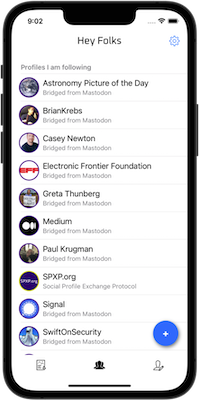
HeyFolks is the official SPXP client for iOS and Android. It browses profiles, displays posts, and manages your social graph โ all without a central server.
Following list
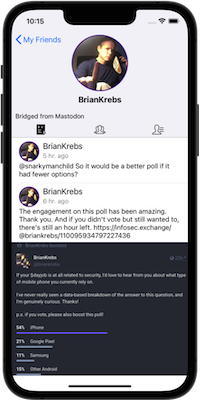
Posts feed
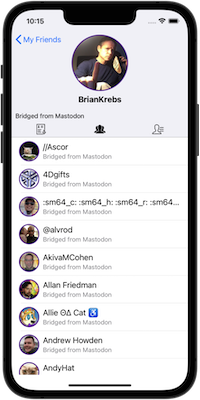
Friends list
The app suggests profiles to follow from a curated directory. Following is client-side only โ profiles you follow won't know about it. No notifications, no follower counts, no social pressure.
Developer tip: Enable "Profile developer controls" in HeyFolks settings. This adds a manual Refresh button so you can immediately see changes during development without waiting for the cache to expire.
SPXP Bridge converts profiles from other protocols (ActivityPub, AT Protocol, Nostr) into SPXP format on the fly. This means you can follow any Mastodon, Bluesky, or Nostr account from within HeyFolks.
# ActivityPub (Mastodon and compatible)
https://bridge.spxp.org/ap/@user@instance.social
# AT Protocol (Bluesky)
https://bridge.spxp.org/at/@user.bsky.social
# Nostr
https://bridge.spxp.org/nostr/<public-key>
For example, to follow the EFF's Mastodon account in HeyFolks, add this profile URI:
https://bridge.spxp.org/ap/@eff@mastodon.social
Paste that URL into HeyFolks' "Add profile" dialog and you'll see EFF's posts in your SPXP feed. The bridge page has more details on supported features and limitations.
Ready to publish your own profile? You just need a text editor and a web server. Let's go.
This is the minimum valid SPXP profile. Save it as profile.json.
{
"ver": "0.3",
"name": "Jane Doe",
"shortInfo": "Developer, builder of things"
}
Any static hosting will work: GitHub Pages, Netlify, Vercel, your own VPS โ whatever you have. Upload the file and note the URL.
# Upload to your server
scp profile.json you@yourserver.com:/var/www/spxp/
# Or use GitHub Pages, Netlify, any static host
# Your profile is now at:
# https://yourserver.com/spxp/profile.json
In the HeyFolks app, tap the blue "+" button in the profiles list, enter your profile URL, and your profile appears โ as long as the JSON is valid.
CORS headers: Make sure your server sends proper Access-Control-Allow-Origin: * headers if you want browser-based clients to access your profile. Most static hosts do this automatically; for nginx or Apache, you may need to configure it explicitly.
A profile without posts is pretty quiet. Let's add some content.
Save this as posts.json. The seqts is a sequence timestamp (ISO 8601) used for ordering; type defines the post format (text, web, image, โฆ); more: false means there are no older posts to paginate.
{
"data": [
{
"seqts": "2026-04-01T12:00:00.000",
"type": "text",
"message": "Hello, world! This is my first SPXP post."
}
],
"more": false
}
Update profile.json to add the postsEndpoint. This can be a relative URL (resolved against the profile URL) or an absolute URL.
{
"ver": "0.3",
"name": "Jane Doe",
"shortInfo": "Developer, builder of things",
"postsEndpoint": "posts.json"
}
Upload both profile.json and posts.json to the same directory on your server. Hit Refresh in HeyFolks (remember to enable developer controls) and you'll see your first post. ๐
Not into self-hosting? SPXP hosting providers take care of the server, signing, and key management โ while keeping your private key on your device.
Your identity is your keypair, not your hosting provider. You can migrate to a different provider โ or your own server โ at any time. Because your posts are cryptographically signed with your private key, they remain verifiably yours even after moving. Followers just need to update your profile URL.
Watch this demo video showing a live profile migration between hosting providers. The signatures prove authenticity throughout โ no content is lost or invalidated.
Migration demo on YouTubeYou've got the basics. Here's where to go next.
The full SPXP specification on GitHub. Everything that's valid, and why.
Step-by-step protocol walkthrough with code examples โ keys, signatures, encryption.
The philosophy and motivation behind SPXP. Why this, why now.
Explore and decrypt testbed profiles using the Java crypto tools. Great for learning the encryption layer.
Learn to sign and encrypt profiles manually with the CLI. Understand the crypto layer hands-on.
A collection of test profiles covering different SPXP features. Perfect for testing your client implementation.
Questions? Something missing?
Open an issue on GitHub โ